Employee view
Personal tasks, leave requests, attendance and permitted records stay together, without opening the administrative workspace.
Industry workflow
Office developers, remote designers, team leads, HR and accounts need different views of the same working month. OPleo connects their attendance, requests, tasks and payroll inputs without giving everyone administrative access.
For a software house, the challenge is the handoff between people: an approved remote day must reach attendance, a leave decision must reach payroll, and a new hire needs the correct manager and portal access. Build the HR workflow around those decisions rather than another spreadsheet for each team.
Consider a fictional team with Lahore office engineers, a hybrid delivery lead and an always-remote designer. The office staff use supported biometric devices. The hybrid employee requests a remote date; approval unlocks portal attendance for that date. The always-remote employee checks in and out through the employee portal.
These are distinct arrangements on the employee record. Remote check-in is a timestamp-based attendance action, not proof of productivity, GPS presence or hours billed to a client.
| Person or team | Daily action | OPleo record |
|---|---|---|
| Office employees | Use mapped biometric punches | Employee-day attendance |
| Hybrid employees | Request a remote day; check in after approval | Approved request and remote attendance |
| Always-remote staff | Check in and out in the portal | Remote attendance history |
| Managers | Assign tasks to active direct reports | Task owner, due date and status |
| HR | Maintain people and review leave | Employee records and approval chain |
| Accounts | Review the attendance-linked payroll month | Rates, deductions and salary slips |
See approved and always-remote attendance →Check office biometric compatibility →
Set departments, optional teams and reporting relationships before assigning work. Supervisors can assign a task with a description and due date to their active direct reports; employees see their own tasks and update status through the portal.
This supports routine handoffs such as onboarding setup, client documentation or a delivery review. It is not a replacement for a full sprint board, source-control workflow, project estimation or client time-tracking system. Keep your specialist engineering tools where they are needed.
Personal tasks, leave requests, attendance and permitted records stay together, without opening the administrative workspace.
Review the owner and current status before assigning the next action. Resolve reporting-line changes so requests and tasks reach the intended supervisor.
A developer’s leave approved in a chat is easy to miss when accounts closes the month. OPleo routes portal leave requests through the configured reporting and approval chain. Approved leave creates the relevant working-day attendance records, and payroll previews use the shared calendar, attendance and leave policy.
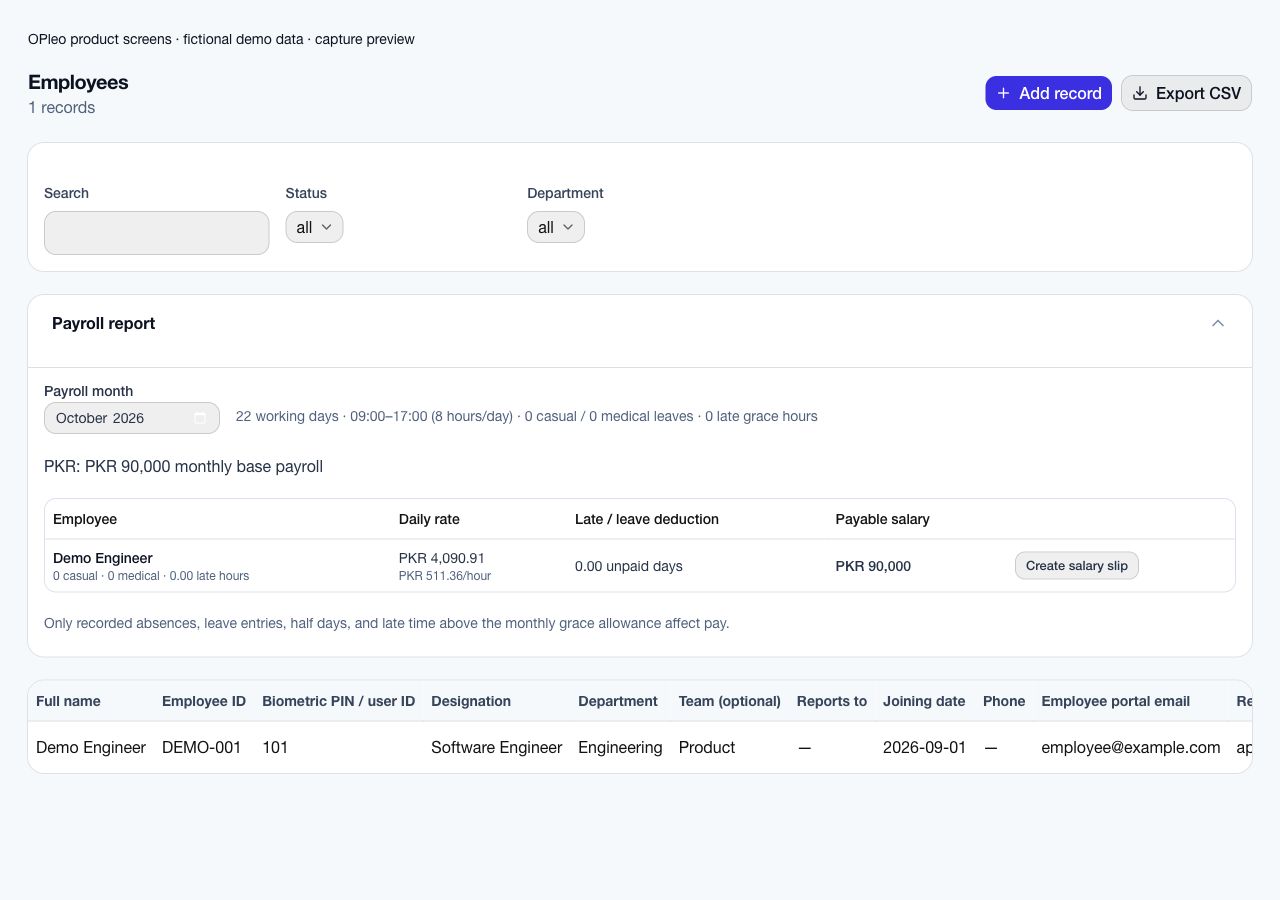
For a monthly employee, review actual working days, configured working weekends, office hours, leave allowances and late grace time before issuing a salary slip. Different daily office-time overrides are supported on employee records; validate each required schedule rather than assuming complex shift or overtime coverage.
A remote attendance record belongs to that same review process. It does not turn missing checkout times or an incorrect policy into a dependable pay result. Nominate owners for attendance corrections and final payroll approval.
Review leave approval workflows →See payroll scope and calculations →
Create a role with its department, location and employment type, share the public application URL and review applicants in the ATS. Candidate stages, interviews and offers keep the hiring decision separate from employee access.
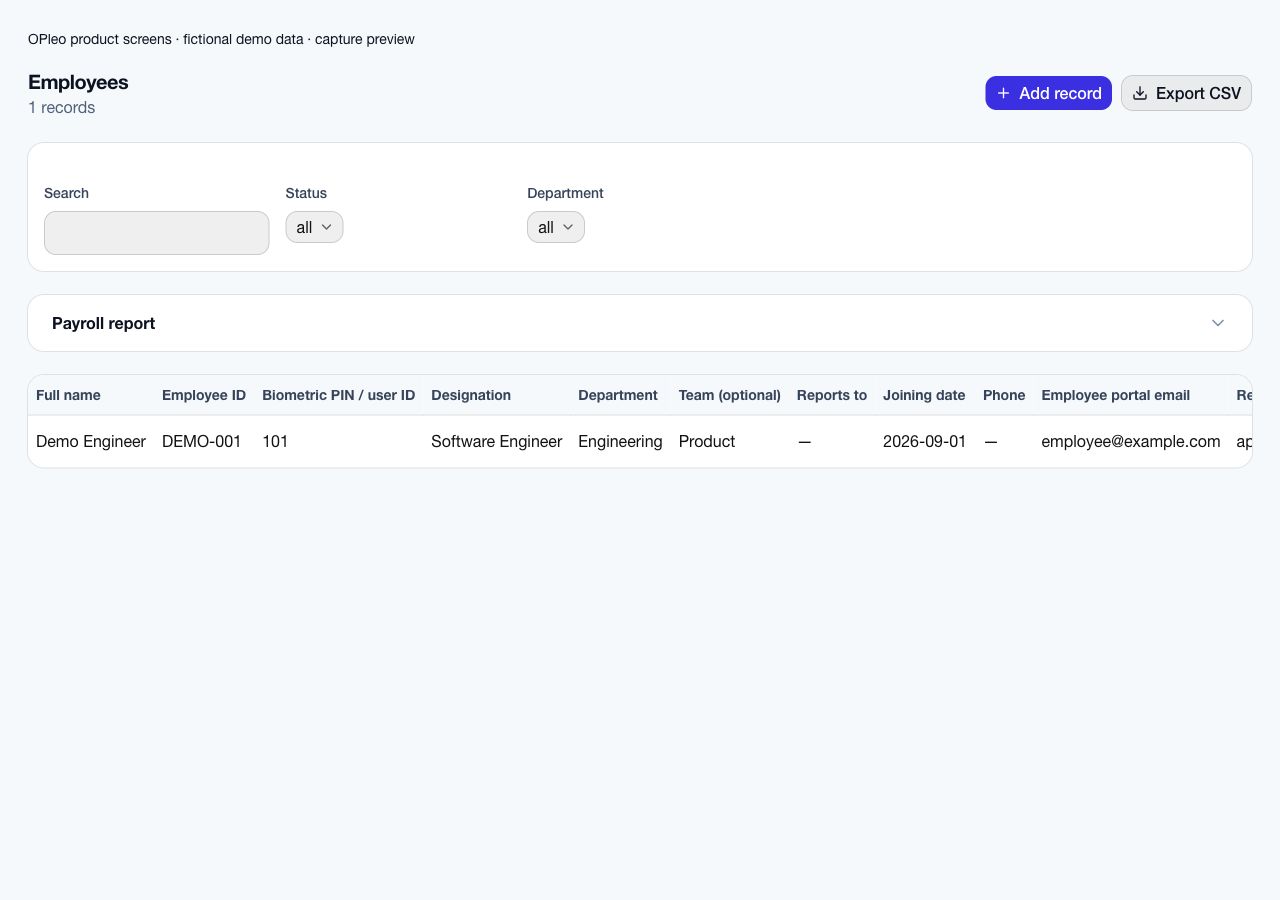
After a hire, establish the employee record: designation, joining date, department, supervisor, salary inputs, remote arrangement and portal email. Then confirm what that person may see and how attendance will be recorded. Candidate response pages support interviews and offers; they are not employee accounts.
See the actual hiring pipeline screens →Prepare the employee record →
Start with three representative arrangements instead of transferring every historical record. Map office biometric IDs, approve a hybrid remote date, and check an always-remote employee’s portal attendance. Run leave approval and task assignment through the actual supervisor relationships.
Reconcile one payroll preview against a reviewed month. Investigate calendar, attendance and policy differences with accounts before choosing a cutover date. Keep the old files for reference and make one system the owner of current people data.
Your workweek, office times, leave approvals, remote eligibility and a redacted payroll example.
Device model and connection method, manager permissions, offer email configuration, task needs and any specialist overtime or time-billing requirement.
Inside the product
Captured from OPleo’s product components with fictional demo records. These are product views, not customer results; each capture shows a separate workflow state.
Yes. Office employees can use supported mapped biometric devices, while always-remote staff use portal attendance. Hybrid staff can use portal check-in on approved remote dates.
Always-remote employees use the portal attendance path. Employees whose remote work needs approval must first have the relevant date approved.
A supervisor can assign tasks to active direct reports. Employees see their own tasks and update the supported task status.
No. Applicants use public application and expiring response pages. Employees need a separately configured employee record and portal access.
No. It feeds a payroll preview using configured policies and calendars. Resolve exceptions and approve the result before issuing salary slips.
Use a redacted example, your attendance setup and the decisions your team needs to make. We can review fit before you move live records.
Request a workflow demo