HR and employees
HR maintains current people data. Employees request leave, retrieve their own attendance and access permitted personal documents and issued salary slips through separate portal access.

HR operations
OPleo brings HR management, attendance and payroll review into one workspace for Pakistan’s growing businesses. Keep employee records, leave decisions and the working calendar connected as your team expands.
If your HRMS search starts with Excel payroll sheets, biometric exports and approvals in WhatsApp, the decision is about how those records reach each other. OPleo connects the people record to everyday requests and pay review, while keeping the final decisions with your team.
A growing Pakistan business may keep staff details in one file, punches on an office device and leave decisions in messages. At month end, someone has to reconcile a salary change, an approved absence and a missing punch before payroll can be reviewed. More tools do not help unless ownership and inputs are clear.
Start by recording employee ID, designation, joining date, department, optional team, supervisor, salary and portal email. Configure the organisation’s working week, office hours, leave allowances and approval levels. Those records then support attendance, requests, payroll previews and employee self-service.
HR maintains current people data. Employees request leave, retrieve their own attendance and access permitted personal documents and issued salary slips through separate portal access.
Reporting lines determine request and task ownership. Accounts reviews the monthly attendance, policy inputs, rates and deductions before salary slips are issued.
Explore employee records and self-service →See leave requests and approvals →
OPleo supports cloud-push / ADMS device workflows, a local connector for legacy LAN-only devices and USB attendance imports. Employee PIN mapping matters: unmatched device identities need review before they can become dependable payroll inputs. Confirm the model, firmware and connection path using your own hardware.
Remote and hybrid employees follow a different path. An always-remote employee checks in and out in the portal. A hybrid employee’s remote date needs approval before portal attendance is available. This is an attendance record, not a GPS or productivity-monitoring claim.
When an employee misses a punch, they can request a missing check-in or check-out for dates within the last 90 days. The request follows the employee’s reporting approval chain. Approved additions update attendance with a correction history; existing punches and approved leave are protected from this request flow.
Use the same month-end review for office and remote employees: investigate incomplete punches, absences, leave and late time. Assign owners for device mapping and approvals so HR and accounts do not maintain competing versions.
Review biometric attendance options →Review remote check-in and check-out →
Publish an open role, receive public applications with CV uploads and track candidate progress through screening, interview, offer and outcome. Interview and offer response pages expose the specific invitation or decision without exposing the hiring workspace.
When a candidate is hired, separately verify the employee record, reporting line, joining date and portal access. A hiring status is not the same as complete onboarding. This distinction helps prevent a candidate email or an unreviewed offer from becoming employee access by assumption.
Inspect the ATS workflow and real product screens →Explore recruitment management →
OPleo’s payroll preview starts with monthly salary and the actual working calendar. It derives daily and hourly rates, then reflects recorded absences, supported leave allowances and late time beyond configured grace. Working Saturdays and Sundays are organisation settings; employee daily office-time overrides are also supported.
Illustrative example: PKR 90,000 divided by 26 working days gives PKR 3,461.54 per day. One unpaid working day gives PKR 86,538.46 before other adjustments. Approved leave is not necessarily unpaid: the configured allowance and actual records determine its treatment.
This is attendance and payroll software for operational review, not a determination of Pakistani statutory compliance. Confirm tax, contributions, overtime, allowances and unusual shift requirements with the responsible specialist before depending on a final pay calculation.
Review supported payroll calculations →Try the daily and hourly salary calculator →
Choose the workflow currently causing the most repeated reconciliation. Clean active employee identifiers, departments, supervisors and portal emails. Configure the calendar and policy before inviting staff or processing the first payroll month.
Pilot a representative group: an office employee, a remote or hybrid employee where applicable, a leave approver and a payroll reviewer. Test a missing punch, approved leave, a late arrival and an issued salary slip. Compare the result with a reviewed source month rather than assuming either system is correct.
Agree a cutover date, ownership of corrections and which historical files stay as references. Confirm the available import/export path for your records; do not assume every old workbook uploads unchanged or every outside tool has a native integration.
Compare OPleo with Excel and plan the cutover →Discuss a representative workflow in a demo →
Software houses need distinct office and remote attendance paths, supervisor-led work and a hiring handoff. Construction teams need a practical way to reconcile site and head-office attendance with clear crew ownership. Agencies may also need invoicing and partial-payment tracking beside people operations.
Select the page that matches your operating model, then test the underlying capability. An industry label does not establish specialist shift scheduling, site access control, project costing or statutory payroll coverage.
HR workflows for software houses →HR workflows for construction teams →HR workflows for agencies →HR workflows for schools →
Inside the product
Captured from OPleo’s product components with fictional demo records. These are product views, not customer results; each capture shows a separate workflow state.
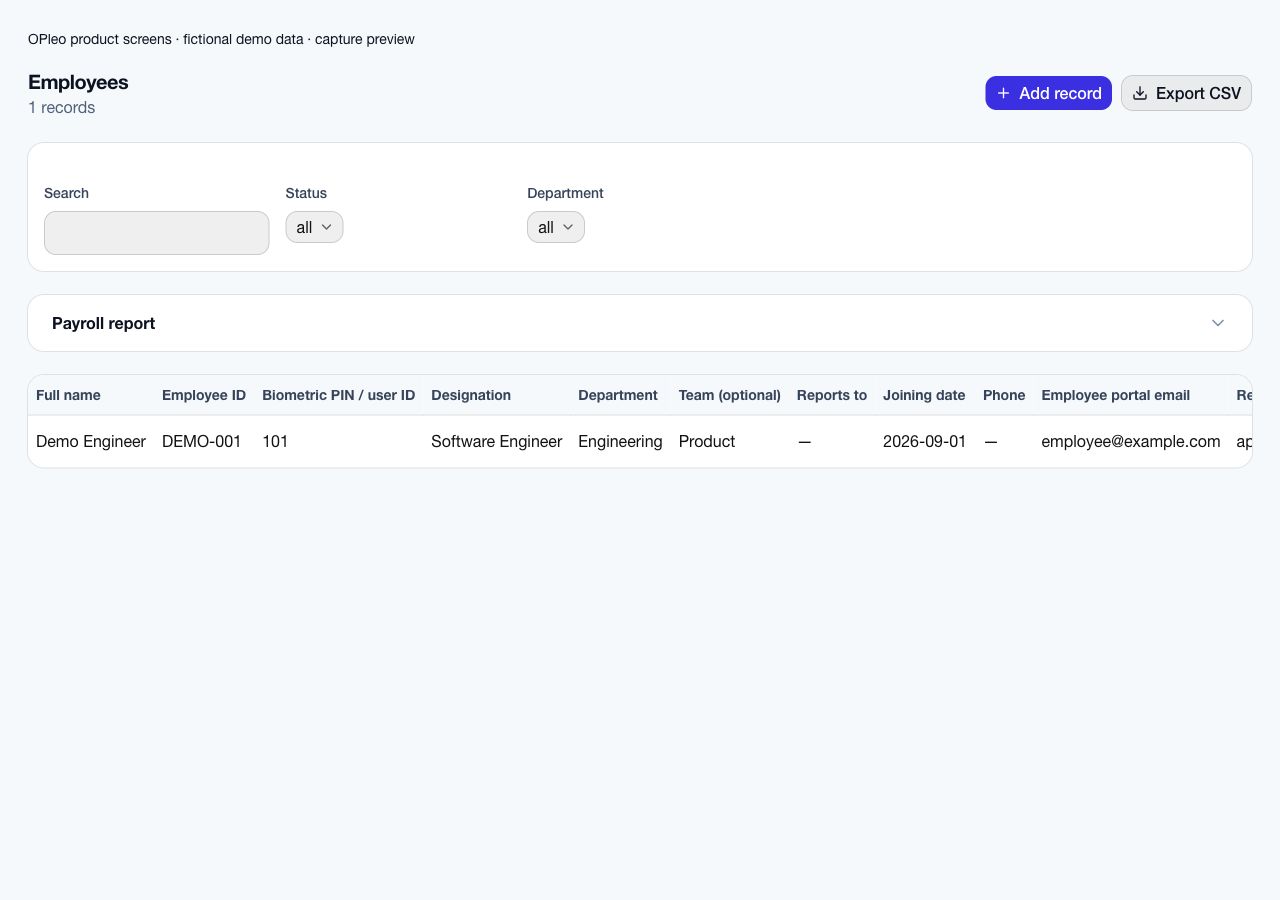
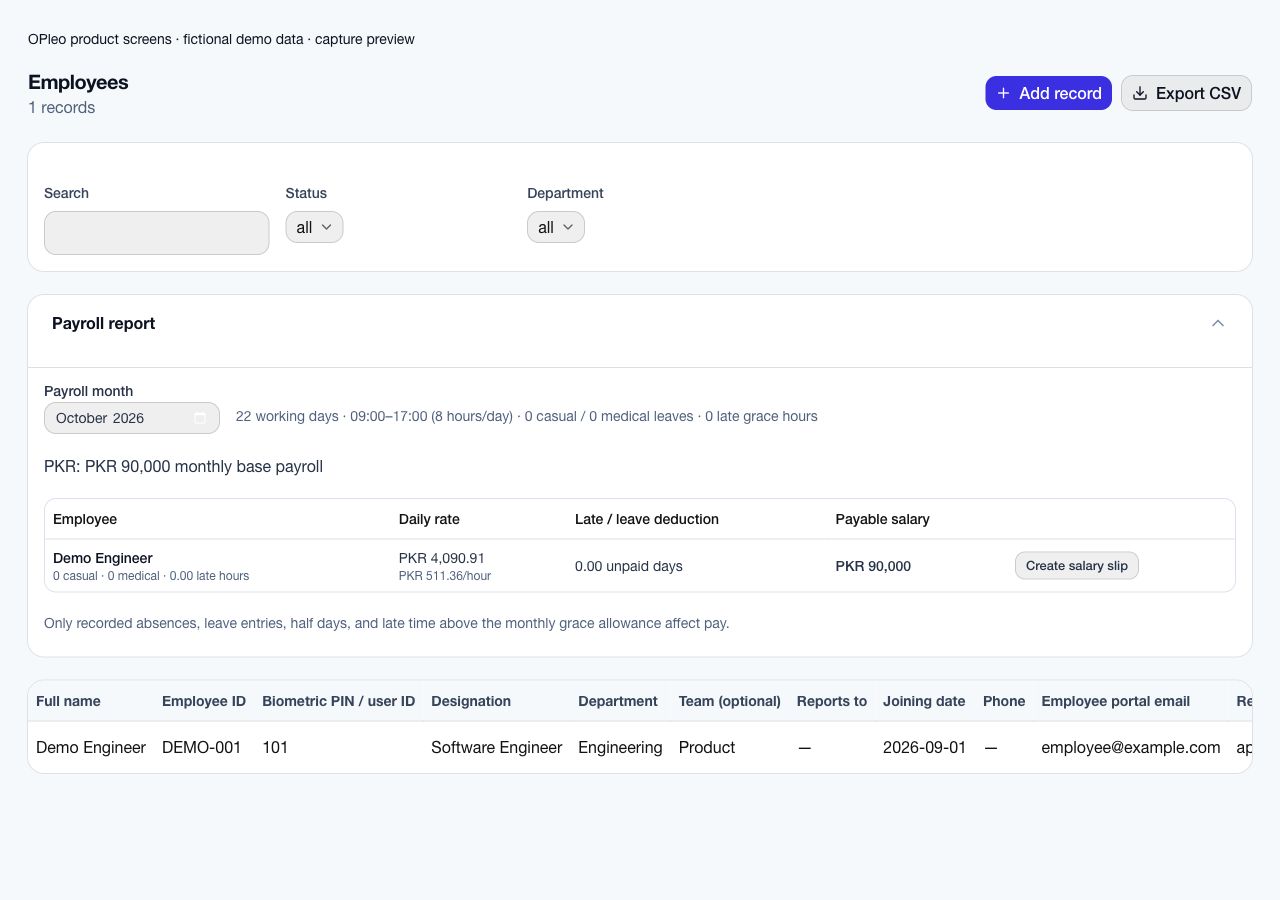
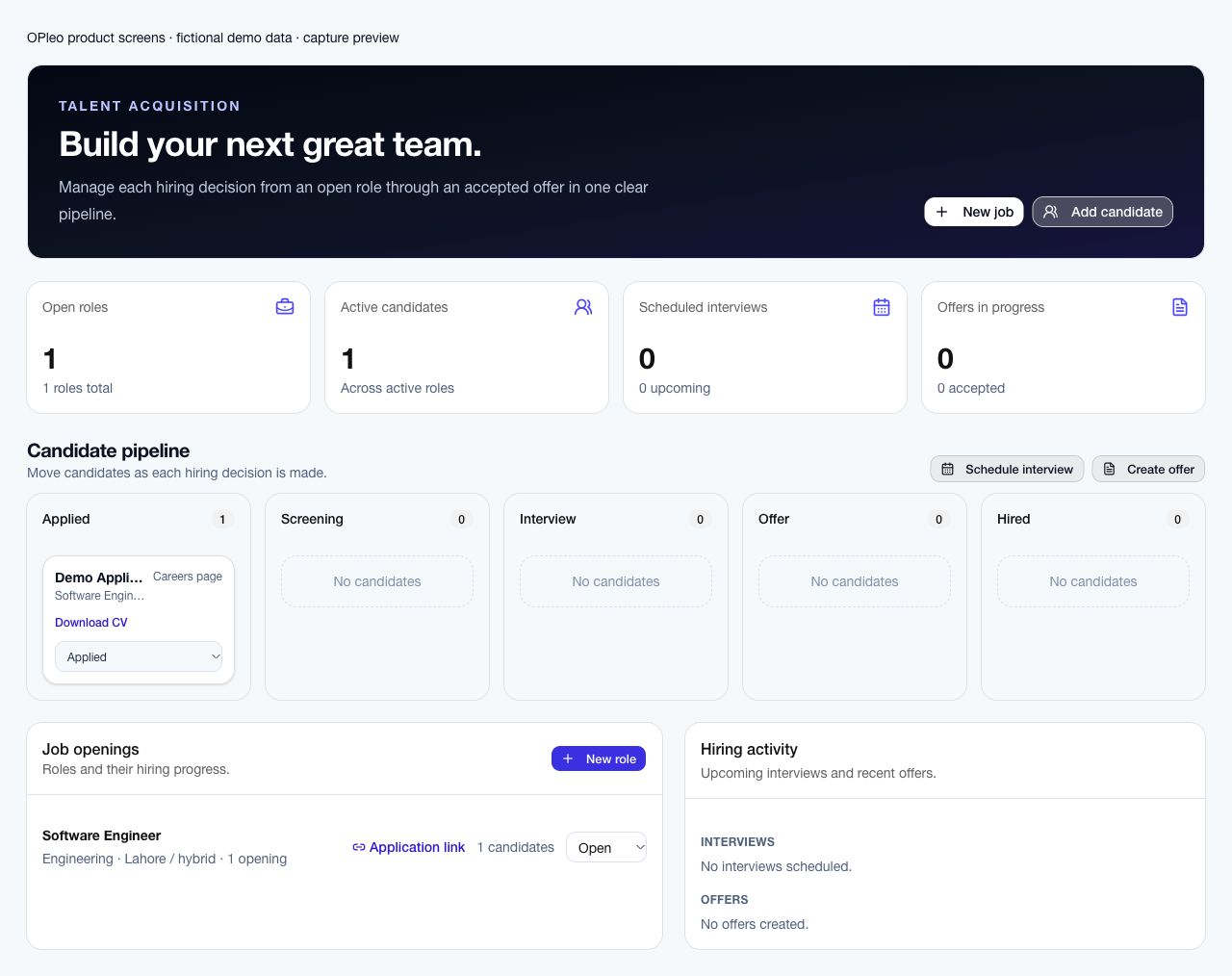
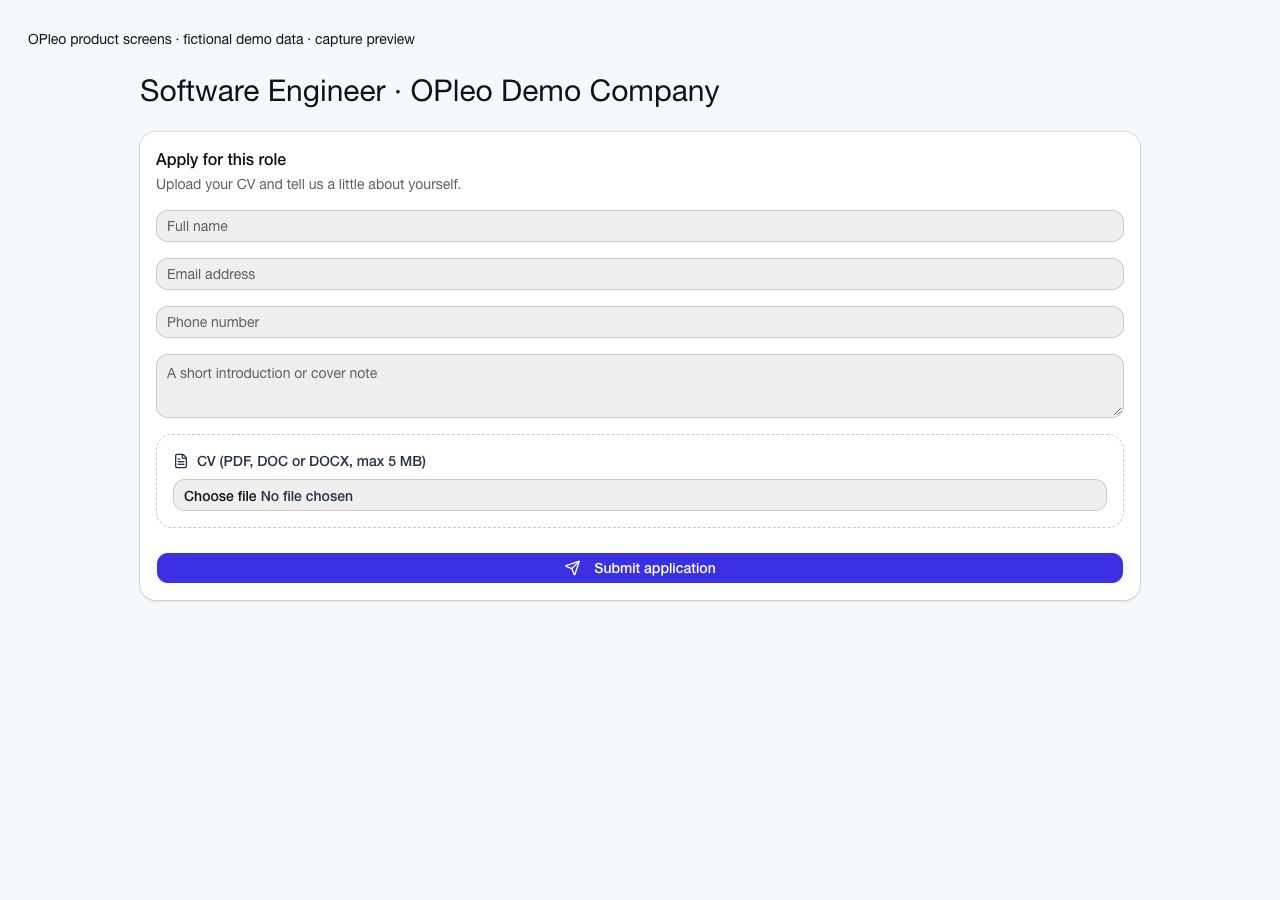
This captioned overview introduces the HR workflow. Use a demo to validate your own policies, attendance sources and payroll month.
Pakistan plans
Compare the monthly subscription and rollout cost before choosing HR and payroll software. Published Pakistan rates are per employee per month; training and integration setup is charged separately.
| Plan | Employees | Per employee / month |
|---|---|---|
| Small | 10–49 | PKR 400 |
| SME | 50–100 | PKR 375 |
| Mid-tier | 101–1,000 | PKR 350 |
| Large | 1,001+ | Request a quote |
Enter your current monthly HR/payroll software total and any first-year setup or other costs. This comparison stays in this browser; it is not sent to OPleo or analytics.
Enter both current-cost amounts to compare. Use the same employee count, included services, time period and tax basis for a useful comparison.
Planning comparison only. OPleo uses published rates and setup; taxes, hardware, custom integrations and support are excluded. A lower figure does not establish equivalent scope or savings. Confirm the full scope in a quote.
One-time training and integration setup: PKR 30,000. For example, 20 employees at PKR 400 cost PKR 8,000 per month, or PKR 38,000 for the first month including setup, before any applicable taxes or additional costs.
Ask about hardware, extra integration work, support and tax treatment. Fewer than 10 employees need a quote. Discuss your team’s rollout and pricing.
Pakistan payroll presets estimate FBR salary income tax using the selected tax year. They do not automatically calculate EOBI or provincial social-security contributions such as PESSI. Contribution applicability and amounts depend on your organization and workforce; ask OPleo to review your payroll scope. The current FBR rate cards are available from the Federal Board of Revenue.
It connects employee records, departments and reporting lines with leave, attendance, payroll previews, recruitment, employee tasks and self-service. Validate the workflows needed by your business in a demo.
Buyers often use HR software, HR management software and HRMS for overlapping employee, leave, attendance and payroll needs. Compare the actual workflows, permissions and supported calculations rather than relying on the category name.
Published Pakistan rates are PKR 400 per employee/month for 10–49 employees, PKR 375 per employee/month for 50–100 employees, PKR 350 per employee/month for 101–1,000 employees. There is a PKR 30,000 one-time training and integration setup charge. Confirm taxes, additional costs and your quote before purchase.
Yes. Supported mapped devices provide office attendance, and approved hybrid or always-remote arrangements use portal check-in/out. Both feed the attendance review.
Yes. Employees can request missing check-in or check-out times for dates within the last 90 days. The request follows the reporting approval chain, and approved additions are recorded with correction history.
No. Payroll can estimate salary income tax using the configured FBR salaried-individual brackets for Tax Year 2026 or 2027, but the employer must choose the correct year and include taxable salary components. It does not file or remit tax, calculate employee-specific credits, or cover every statutory contribution, overtime rule or specialist pay arrangement; have the result reviewed.
Yes. Establish reliable people data and approvals first, then introduce attendance and payroll after validating each handoff. Confirm the commercial and implementation scope with the team.
Yes. Organisations have their own employees, policy settings and data scope. Validate the selected organisation and employee access before processing records.
Use a redacted example, your attendance setup and the decisions your team needs to make. We can review fit before you move live records.
Request a workflow demo